NewsBreak Lite
- 4.7
- Rating
- 100.00K
- Installs
- Free
- Price

 Analysis by App-foxy
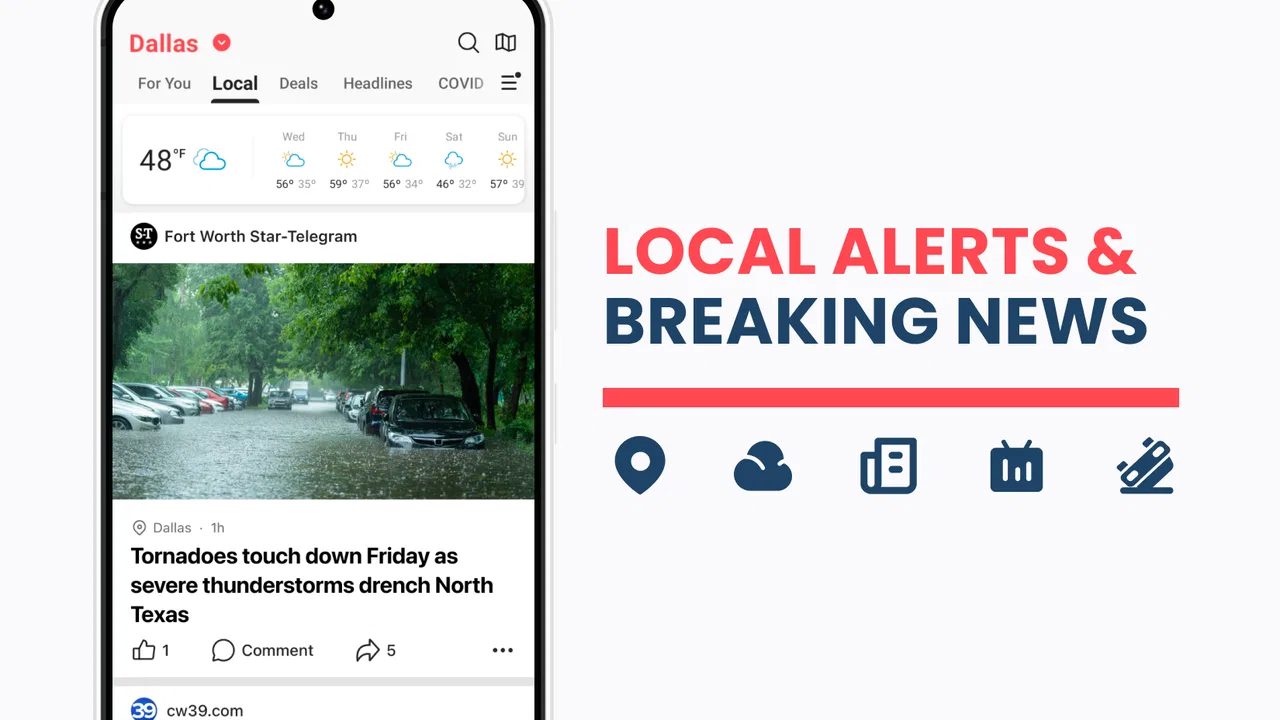
I approached NewsBreak Lite as a practical local-news app rather than another place to scroll endlessly. Its purpose is straightforward: help me notice what is happening around my neighborhood, especially when I do not have time to search several local sources myself. That makes the important question less about how much news it contains and more about whether its alerts and feed fit the way I actually keep up with nearby events.
After using it as a lightweight news companion, I found the strongest case for it is convenience. It is a free app in the News & Magazines category, developed by Particle Media Inc., and it is aimed at readers who want local headlines gathered into one phone-based experience. The app is rated for Everyone 10+, so it is broadly approachable, although local news can naturally include serious or unsettling subjects that parents may still want to discuss with younger users.
How I decided whether it was worth keeping
My first test was simple: could I understand what was happening nearby without turning the app into a second job? A local-news reader needs to make location selection, headline scanning, and notification control feel manageable. If the feed is too broad, the benefit disappears. If alerts arrive too often, I stop trusting them. NewsBreak Lite makes the most sense when I treat it as a quick check-in tool rather than my only source for important information.
You May Also Like

 Blood Strike: 2.5 Anniversary
Blood Strike’s Loadouts Turn Every Drop Into a Tactical Gamble
A close look at Blood Strike’s custom loadouts: how fast access to signature weapons reshapes its battle royale rhythm, rewards preparation, and narrows the gap between fights.

 Pandora - Music & Podcasts
Pandora’s Music Is Easy to Start, but Harder to Recover
Pandora’s strength is its low-effort path from a seed to a station. Its weak spot is how much confidence it asks you to place in connection, setup, and quiet recovery.

 8 Ball Pool
 Is Built on Rivalries, Rematches, and Routine
A close look at the rivalries, rematches, shared routines, and unanswered safety questions that turn a quick pool match into a persistent mobile community.

 Samsung Music
’s Quiet Strength Is Playing What You Already Own
Its reach comes less from spectacle than from dependable access to a personal library. That simplicity is both the app’s strongest retention engine and its ceiling.

 AccuWeather: Weather Radar
AccuWeather Review: A Quick, Clear Forecast for Everyday Decisions
For everyday plans, the best forecast is the one you can understand quickly. AccuWeather makes rain timing, radar, and local conditions easy to act on, with a few trade-offs.

 Hill Climb Racing
Why Hill Climb Racing Still Turns Crashes Into One More Run
A tiny car, a bumpy hill and one more upgrade: Hill Climb Racing keeps resurfacing because its simple chaos makes every near-miss feel personal.
More From Our News Desk



I also looked at how well it serves different reading habits. Someone who checks headlines during breakfast needs a fast overview. Someone who follows school closures, traffic disruption, neighborhood safety, or community events needs timely prompts. A person who prefers long-form reporting from one newspaper may want a more focused publication app instead. Those are different needs, and this app should be judged against the right one.
The current release is version 26.13.0 and requires Android 8.0 or later. That makes compatibility an important practical detail for anyone using an older handset. On a supported device, the experience is positioned as a lighter way to reconnect with local coverage, not as a replacement for every national or specialist news source.
The everyday routine that suits it best
My favorite way to use a local-news app is in short sessions. I can open the feed while waiting for coffee, scan the leading headlines, and decide whether anything deserves a deeper read. The useful habit is to avoid opening every notification immediately. I first look for the subject, the location, and whether the item affects something I need to do that day. This prevents a breaking headline from taking over my morning when it is merely interesting rather than relevant.
A realistic example would be a weekday when heavy weather, a road incident, or a change affecting local services might alter my plans. Instead of checking several social feeds and hoping someone has posted accurate information, I can use the app as an early signal that something nearby deserves attention. I would still confirm major decisions through an official source, but the alert can save me the effort of discovering the issue from scratch.
That workflow is more valuable than simply having another stream of headlines. The app becomes a reminder system for local awareness. I can glance at it before leaving home, again during a break, and later in the evening if a story continues to develop. The trade-off is that this approach depends on disciplined notification settings. If I allow every alert to interrupt me, the convenience becomes noise.
What makes the local focus useful
The clearest strength is the emphasis on nearby news. National apps are good at major events, but they often make local stories feel buried beneath politics, entertainment, business, and international coverage. A neighborhood-focused feed reverses that priority. For me, that changes the value of a five-minute reading session: I am more likely to encounter something connected to my commute, community, or immediate surroundings.
There is also a psychological advantage to having a dedicated local-news space. I do not need to remember which publication covers a particular town or keep several browser tabs open. The app gives me one starting point. That does not guarantee that every story will be equally useful, but it lowers the effort required to begin looking.
Its scale is also a useful signal for people who prefer established apps over untested downloads. NewsBreak Lite has passed one hundred thousand installs and holds a 4.6 average from around three thousand ratings, with 392 written reviews. I would not treat those figures as proof that it will fit every location, but they do suggest that the app has attracted a meaningful audience and gives prospective users some social evidence before installing.
Small habits that improve the experience
My first practical tip is to use the app as a filter, not as an automatic authority. When a headline concerns health, safety, money, or an urgent public instruction, I read the details carefully and look for confirmation from the relevant official organization. A local headline can be useful for discovery while still being too brief to support a serious decision.
My second tip is to separate “need to know” from “nice to know.” Alerts about immediate local developments deserve a different level of attention from general community stories. If the notification stream starts shaping my entire day, I reduce its role and return to scheduled check-ins. This is a better arrangement than deleting the app after a few overly frequent interruptions.
My third tip is to use the feed for discovery, then follow through deliberately. If I see a story about a local issue that matters to me, I save the subject mentally and search for the responsible organization, a full report, or an update later. In that role, NewsBreak Lite is most helpful at the beginning of the research process. It points me toward what deserves investigation without pretending that a headline is the complete picture.
Where it wins, and where another kind of app may fit better
I find the best way to judge whether a local-news app earns a lasting place is to look beyond the first burst of curiosity: does it help me make better everyday choices without demanding constant attention? I’ll weigh that recurring usefulness against the alternatives, then consider the small habits that keep a news feed from becoming another source of fatigue.
Why I would choose it over a general news reader
I would choose NewsBreak Lite when my main priority is local awareness and I want one convenient place to start. A general news app usually gives me a wider national and international view, but that breadth can make nearby developments harder to notice. Here, the local angle is not an occasional section hidden among larger stories; it is the reason to open the app.
It is also a sensible option for people who do not want to build a personal collection of local publication apps. Installing several sources can produce duplicated headlines, different notification systems, and a cluttered home screen. A single local-news app reduces that friction. The compromise is that readers who already have a strong relationship with one trusted local newspaper may find a dedicated publication app more consistent in tone and coverage.
Another advantage is the low entry cost. The app is free to install, so I can test whether its local feed is useful before committing money or reorganizing my reading habits. There are in-app purchases ranging from one dollar to fifty-nine dollars and ninety-nine cents per item, so I would pay attention to any purchase prompt and decide whether the free experience already meets my needs. For casual local reading, the ability to try it without an upfront charge is a meaningful benefit.
When a dedicated publication is the better choice
I would look elsewhere if my main goal were deep reporting from one editorial team. A publisher-specific app can be preferable for readers who care about a particular newspaper’s investigations, columnists, archives, or subscription relationship. NewsBreak Lite is better viewed as a convenient doorway into local headlines than as a substitute for every form of original journalism.
I would also compare alternatives if I needed a highly specialized feed. People who mainly follow finance, technology, sports, weather, or national politics may get more value from an app built around that subject. The local-news focus is an advantage only when local relevance is genuinely the deciding factor.
There is a further trade-off in convenience-based aggregation: a single feed can simplify discovery, but it can also encourage passive reading. If I only scan whatever appears in front of me, I may miss the context or editorial depth I would get by intentionally visiting a trusted source. My solution is to use the app for awareness and another source for verification or detailed reading when the subject matters.
Who should skip it
I would skip this app if I rarely care about nearby news, dislike notification-driven products, or already have a local source that gives me everything I need. I would also avoid making it my sole source for urgent information. Its value comes from convenience and discovery, not from replacing official announcements or careful reporting in every situation.
Readers with older phones should check the operating-system requirement before planning around it, since the app needs Android 8.0 or later. For everyone else, the more important question is geographic usefulness: a local-news app can be excellent in one area and much less relevant after a move or while traveling. I would reassess the feed whenever my location or daily routine changes.
What switching really costs
Moving from a general news app to NewsBreak Lite is not technically difficult, but the real cost is attention. I have to decide which alerts deserve permission to interrupt me, learn how the local feed fits into my routine, and resist the temptation to treat every headline as equally urgent. The installation itself is easy; building a calm reading habit takes longer.
Switching in the other direction has its own cost. If I leave this app for a publication-specific reader, I may gain a clearer editorial identity but lose the convenience of seeing a broader selection of local headlines in one place. If I move to a national news app, I may gain stronger coverage of major events while giving up some immediacy around neighborhood concerns. There is no universal winner because the trade is between breadth, depth, and local relevance.
I would begin with a short trial rather than immediately making it my default news source. I would install it, check whether the local stories match my interests, observe how useful the alerts are during normal days, and then decide whether it earns a permanent place on my phone. Because it is free to start, this test is relatively low risk, but I would still review purchase prompts carefully before spending anything.
My recommendation after using it
I recommend NewsBreak Lite to readers who want a quick local-news check-in and do not want to assemble several separate sources. Its strongest use is a morning or evening scan, followed by more careful reading elsewhere when a story affects a real decision. The combination of local focus, free access, and a lightweight routine makes it easy to try.
I would not recommend relying on it alone for serious news decisions, nor would I push it toward someone who wants long investigative pieces from one publication. In those cases, a trusted publisher app, an official service, or a specialist news reader may be the better choice. The app works best when I give it a defined job: alert me to nearby developments, help me discover relevant stories, and let me decide what deserves deeper attention.
Particle Media Inc. has made a focused tool for people who feel disconnected from what is happening around them. The 4.6 average and more than one hundred thousand installs make it a reasonable candidate for a trial, but my recommendation still depends on how well its local coverage matches your area and how carefully you manage notifications. For convenient neighborhood awareness, it is worth trying; for complete, authoritative coverage, use it as one layer in a wider news routine.
FAQs for NewsBreak Lite
01What is NewsBreak Lite and how does it differ from the original NewsBreak app?
NewsBreak Lite is a streamlined version of the popular NewsBreak app, designed to deliver news updates with reduced data usage and faster performance. It offers a simplified interface and focuses on core features, making it ideal for users with limited data plans or older devices, while still providing timely news from a variety of sources.
02Does NewsBreak Lite provide local news updates?
Yes, NewsBreak Lite is tailored to offer local news updates alongside national and international stories. By allowing users to enter their location, the app curates news that is relevant to your area, ensuring you stay informed about local events, weather, and other important updates.
03What are the main features of NewsBreak Lite?
NewsBreak Lite focuses on essential features such as personalized news feeds, local updates, trending stories, and a simplified user interface. Unlike the full version, Lite aims to deliver the most crucial news without additional features like video content, making it faster and more efficient for users who need quick access to headlines.
04Is NewsBreak Lite available for both Android and iOS devices?
Yes, NewsBreak Lite is available for download on both Android and iOS platforms. The app is optimized to perform well on a wide range of devices, including those with lower specifications, ensuring that users across different platforms can access the latest news without performance issues.
05Does NewsBreak Lite require a subscription or in-app purchases?
No, NewsBreak Lite is a free app that does not require a subscription or any in-app purchases. Users can access all its features without any cost. The app is supported by ads, which help keep the service free for everyone, while still providing quality news content.
Pros
- Lightweight and fast to load.
- Customizable news feed options.
- Minimal data usage.
- User-friendly interface.
- Offline reading mode available.
Cons
- Limited news sources available.
- No dark mode feature.
- Ads can be intrusive.
- Lacks advanced search options.
- No video news content.

NewsBreak Lite
Gallery